Minecraft Accessory APIForgeNeoForge
Curios mod Minecraft Guide

Curios Mod for Minecraft: Accessory Slots, Setup & Download Guide

Curios Mod is a flexible accessory and equipment API used by compatible Minecraft mods to add and manage extra equipment slots. Check loader compatibility, match the correct Minecraft version, and follow a clean setup path before you install.

API typeAccessory & equipment
LoadersForge / NeoForge
Setup ruleMatch versions first
Curios ModMinecraft API
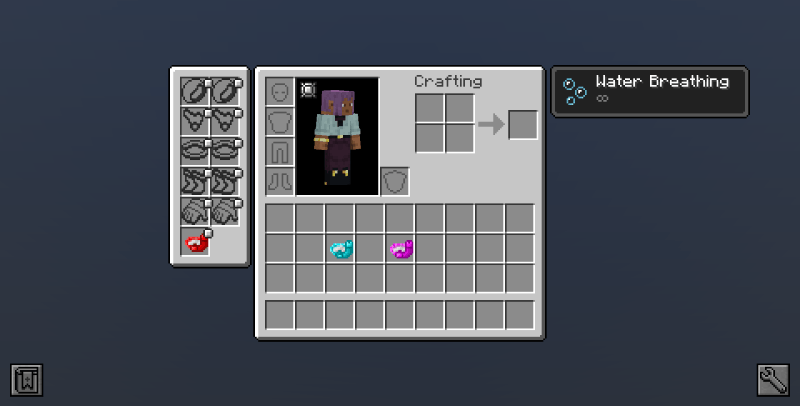
Curios mod accessory slots interface for Minecraft
Extra slotsRings, charms & compatible gear
Before launchCheck Minecraft + loader version
Curios mod editorial compatibility illustration
About / What Is

A common language for accessory slots.

Instead of every Minecraft mod inventing an isolated equipment system, Curios gives compatible mods a shared API for registering and using accessory-style slots.

Think of Curios as the framework that helps different mods agree on where extra equipment belongs.
API-firstBuilt for integrations rather than a large content pack.
ExpandableCompatible mods can define and use additional slot types.
VersionedMinecraft, loader and dependency versions must match.
Features

Small API. Big compatibility role.

The value is in coordination: shared slot identifiers, integration points and a predictable way for compatible mods to expose equipment.

01

Expandable equipment slots

Mods can add accessory-style slots without replacing the vanilla armor inventory.

02

Cross-mod compatibility

A shared API helps different mods target common slot definitions instead of competing systems.

03

Configurable behavior

Available controls depend on Curios and the mods that integrate with it, giving packs room to shape equipment behavior.

04

Dependency awareness

Loader error messages can identify missing or incompatible Curios versions required by other mods.

How It Works

Match first. Install second.

Most Curios problems are not about installation clicks; they are about mismatched versions. Use a four-point check before launching the game.

1

Minecraft

Identify the exact game version used by your profile or modpack.

2

Loader

Confirm whether the profile uses Forge, NeoForge, or another ecosystem.

3

Dependencies

Match Curios to the requirements listed by the mods that depend on it.

4

Test

Back up important worlds, launch once, and read any loader error before adding more mods.

Use Cases

Where Curios fits in a modded setup.

Modpack core

Accessory ecosystems

Curios is most useful when several mods need rings, charms, belts, amulets or other extra equipment concepts to coexist without separate inventory systems.

Mod dependencies

Some mods require Curios to load because their wearable items are built around its API.

Pack building

Creators can standardize equipment behavior across multiple content mods.

Compatibility checks

Version and loader matching helps reduce startup errors when assembling a profile.

Troubleshooting

Dependency messages often reveal which Curios build another mod expects.

Compatibility

Loader choice changes the answer.

Do not choose a Curios file by Minecraft version alone. Loader family matters too.

Modern project path

  • Forge buildsSupported family
  • NeoForge buildsSupported family
  • Minecraft 1.20.x / 1.21.xUse matching file

Fabric warning

The original Curios Fabric branch was discontinued after the 1.16.5 era. A search such as “Curios API Fabric 1.21.1” should not be treated as proof that a modern official Fabric build exists.

  • Fabric 1.16.5Legacy branch
  • Fabric 1.21.xDo not mix loaders
Download

Download Curios mod

Before using the provided archive, confirm that it is the file you intend to download and that it matches your setup. Keep a backup of modded worlds and configs before replacing dependencies.

Check versionCheck loaderBack up first
Download Curios mod
Original Curios mod download checklist illustration
!

Safety notice

Mod files are executable game components. Prefer trusted project distribution channels, compare filenames and versions carefully, and scan unexpected archives. Never disable security software just to make an unknown file run.

Installation / Setup

A clean setup in four checks.

Open the correct profile

Confirm the Minecraft version and mod loader before changing files.

Back up the profile

Copy important worlds, configs and the current mods list.

Place the matching JAR

Keep the correct Curios build in the profile’s mods folder and remove obsolete duplicates.

Launch and read the log

If the loader stops, use the dependency message rather than guessing another version.

Release Information

Read the filename.

Curios filenames typically reveal the loader family and target Minecraft version. Treat labels such as 1.20.1, 1.21.x, Forge and NeoForge as compatibility information—not interchangeable marketing names. If a dependent mod asks for a specific API range, follow that dependency requirement.

Curios mod 1.20.1 Curios mod Forge NeoForge

Pros

  • Shared accessory/equipment API for compatible mods.
  • Helps reduce duplicated slot systems in a modpack.
  • Useful dependency messages when versions do not match.
  • Works as infrastructure for a broad range of content mods.

Cons

  • Does not automatically add a large catalog of wearable items.
  • Requires careful Minecraft and loader version matching.
  • Dependent mods may target different Curios versions.
  • Legacy Fabric information can confuse users searching for modern builds.
Troubleshooting

Start with the exact mismatch.

Startup dependency errorWrong or missing Curios buildMatch Minecraft, loader and the dependent mod’s required Curios range.
Duplicate mod warningMore than one Curios JARRemove obsolete duplicates after confirming which file the pack requires.
No accessory slotsNo mod registered usable slotsCheck whether installed content mods actually integrate with Curios.
Crash after updateDependency version driftRestore the backup, then update related dependencies together rather than one file at random.
Guides Preview

Go deeper without repeating the basics.

Curios Minecraft: add slots

See how slot registration fits into a compatible mod ecosystem.

Read guide →

Curios mod 1.20.1

Use a version-specific compatibility checklist before installing.

Read guide →

Common Curios errors

Translate dependency messages into practical fixes.

Read guide →
FAQ

20 clear answers.

Version, loader, setup and troubleshooting questions—organized for quick scanning.

Basics & Compatibility

Curios is an accessory and equipment API that lets compatible Minecraft mods define and share extra equipment slots without each mod building a separate slot system.
Curios mainly provides the slot and integration framework. The items that use those slots normally come from other compatible mods.
No. Modern Curios releases are generally intended for both client and server environments, so a modpack should follow the requirements of the exact Curios build and dependent mods.
Yes. A compatible mod can register or request slot types, while pack creators may also configure behavior depending on the Curios version and mod setup.
Curios has long supported Forge, and modern releases also include NeoForge. Match the Curios file to the Minecraft version and loader in your pack.
The old official Fabric branch was discontinued after Minecraft 1.16.5. For modern versions, do not assume a Forge or NeoForge Curios file is interchangeable with Fabric.
It refers to a Curios build made for Minecraft 1.20.1. The loader and dependent mod versions must also match that Minecraft release.
No. Minecraft mods are version-sensitive. A 1.16.5 build should not be treated as a drop-in file for 1.20.x, 1.21.x, or later releases.
Curios may be installed correctly even when no accessory items appear. Slots and usable items are normally supplied by compatible mods or configuration.
For a normal modded Minecraft profile, the matching Curios JAR belongs in that profile’s mods folder alongside required loader and dependency files.

Setup & Troubleshooting

Common causes include a wrong Minecraft version, wrong loader, missing dependency, duplicated Curios file, or another mod expecting a different Curios API version.
Confirm whether the profile is Forge, NeoForge, or another loader and install a Curios build made for that exact loader and Minecraft version.
Usually no. Keep the one version required by the pack or dependent mods unless a pack author explicitly documents otherwise.
Back up the world, configuration folder, and mod list. Version changes can affect dependencies and saved modded data.
Review the mod loader error screen or latest log for dependency messages. Modpack manifests and individual mod requirements can also identify Curios as a dependency.
Curios is primarily a compatibility API, not a performance optimizer. Stability depends more on correct versions, dependencies, and the wider modpack.
Use trusted project or mod-distribution sources when possible, verify filenames and versions, and scan unexpected archives before running or extracting anything.
The interface may depend on version, keybinds, another mod, or whether any relevant slots are registered. Check controls, mod dependencies, and version matching first.
It can expose conflicts when mods target incompatible API versions or duplicate similar systems. Matching versions and reading the loader log usually reveals the cause.
Start with the exact error message, Minecraft version, loader, Curios version, and the mod that depends on it. That combination usually narrows the problem quickly.